

Runners
Learn how Tilebox tasks are executed, selected for execution, versioned, and compare release runners and direct runners.
Runners are continuously running processes that listen for new tasks to execute. They claim queued tasks, execute them, and report task results back to Tilebox. You can start multiple runners in parallel to execute tasks concurrently or to provide different hardware and network access.
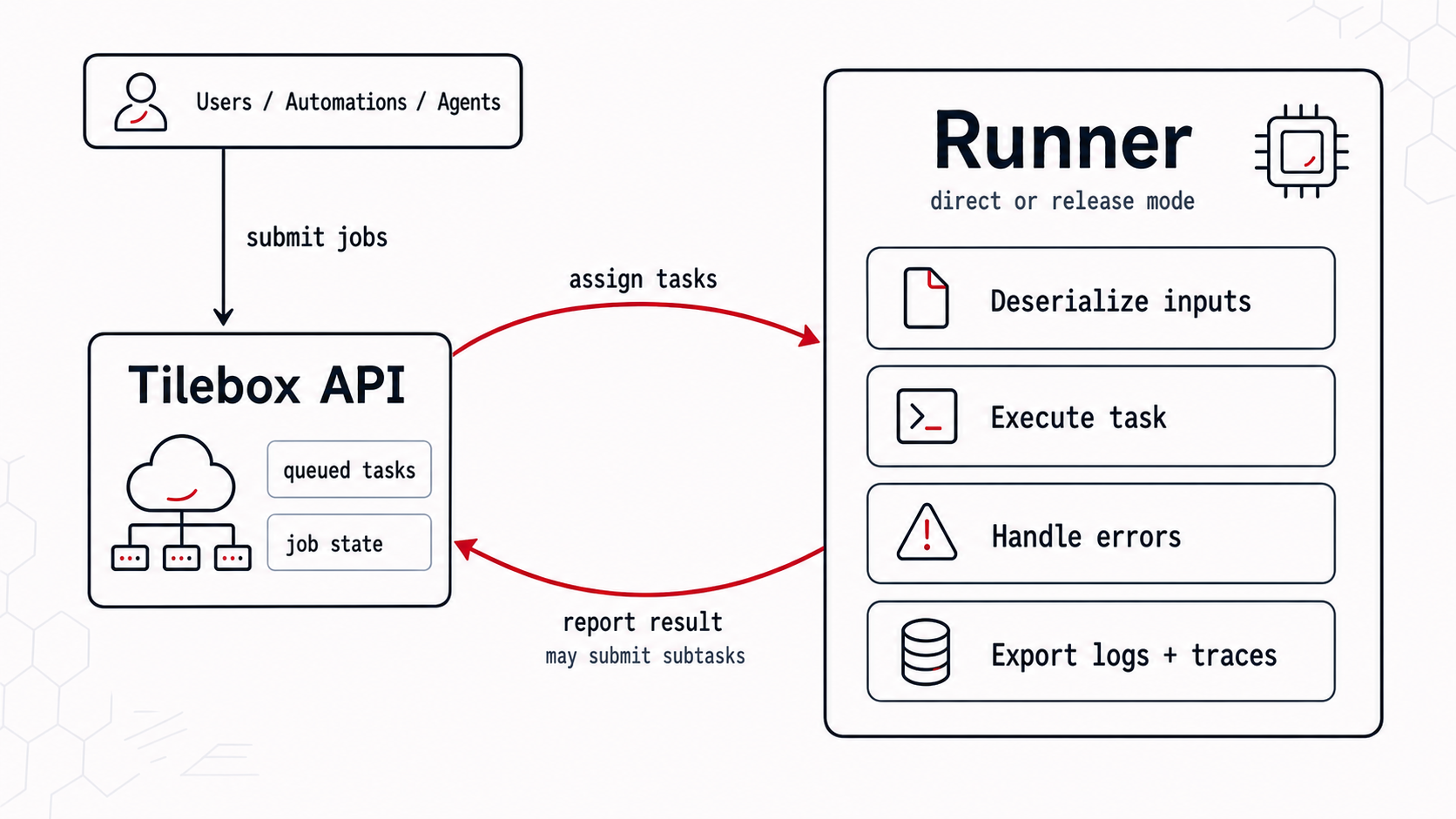
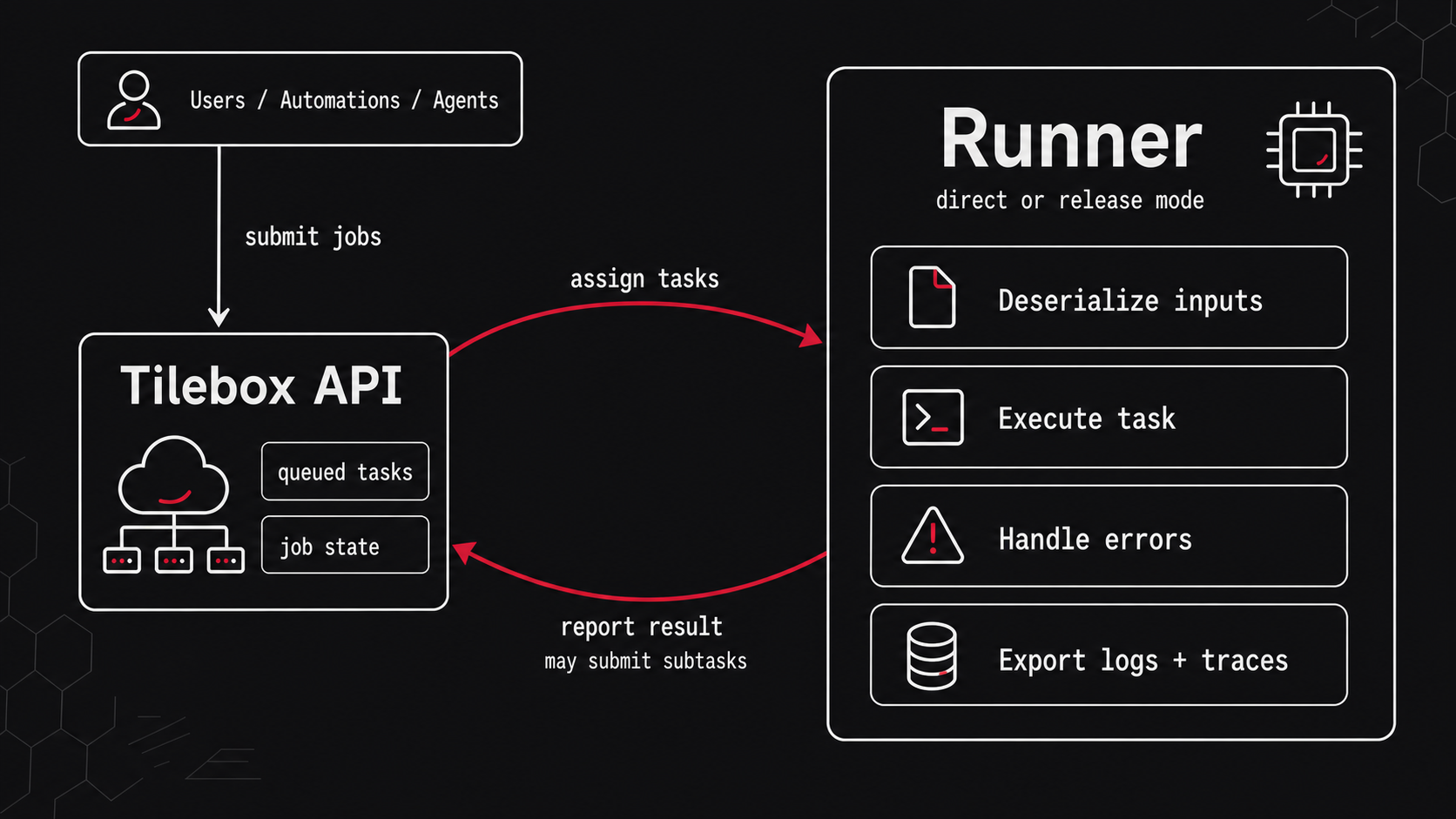
Runner modes
Tilebox supports two runner modes. A release runner is started with the Tilebox CLI, loads workflow releases deployed to its cluster, and reacts to updated cluster deployments while it runs. A direct runner is a standalone script, service, or binary that uses the Tilebox SDK to connect to the API and register tasks directly. Release runners still run in an environment you control, but the workflow code they execute is selected through cluster deployments. This separates compute operations from workflow release rollout. Direct runners are scaled and rolled out by your own infrastructure.
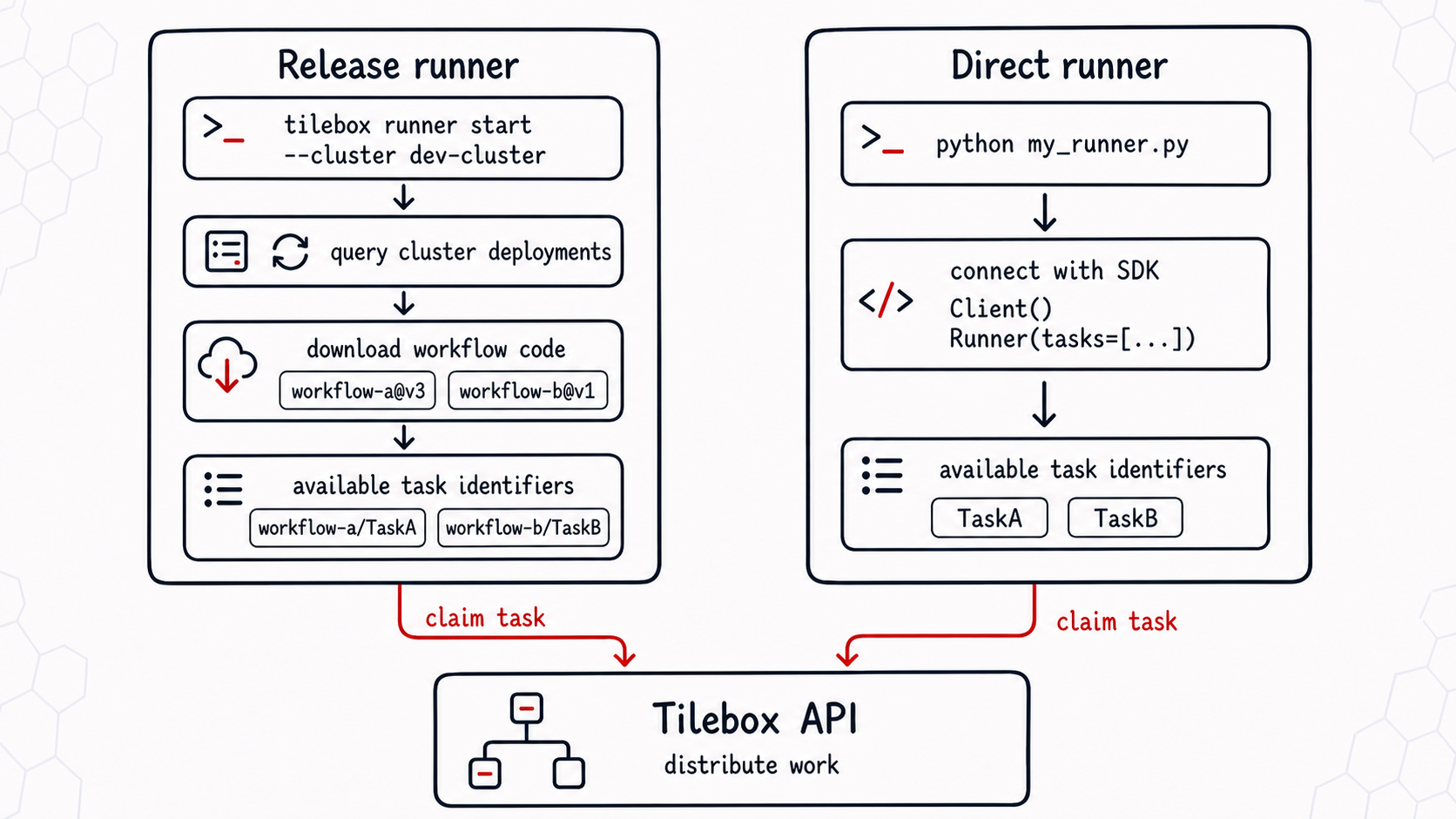
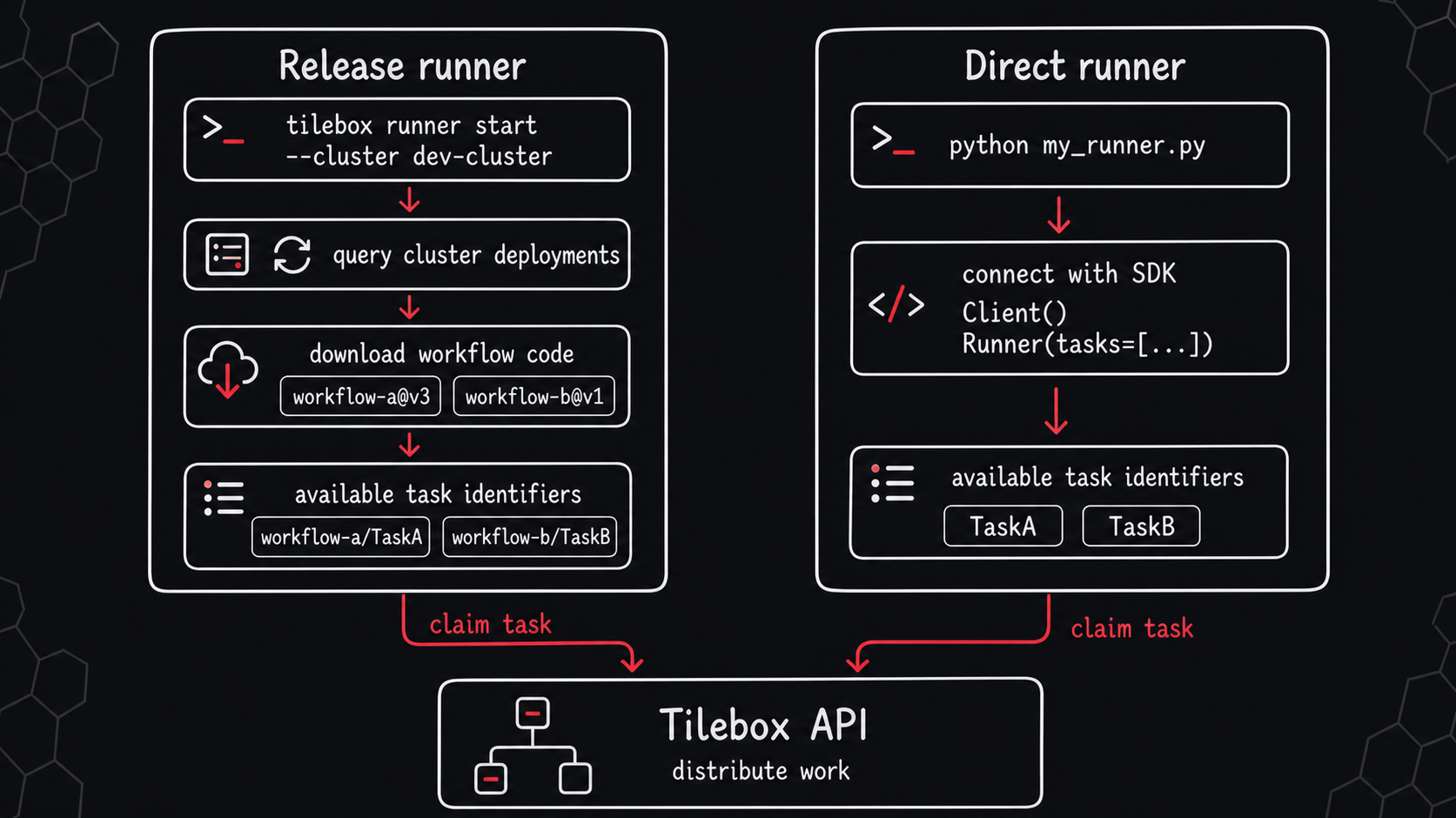
The two modes differ in how the runner gets its task registrations and how you roll out code changes.
| Release runner | Direct runner | |
|---|---|---|
| Executable tasks | Loaded from workflow releases deployed to the runner’s cluster | Registered directly in your script, service, or binary |
| Runtime | CLI invokes the Python workflow project runtime from the release artifact | Your python script or Go binary, implemented with the Tilebox SDK |
| Start command | tilebox runner start --cluster <cluster-slug> |
python runner.py, ./my-runner-binary, or your own deployment |
| rollout model | You publish releases and deploy them to clusters, the runner automatically picks up deployment changes | You deploy, restart, scale, and roll back the runner process yourself |
| Best for | Reproducible releases, fast cluster deployments, and AI-assisted workflow iteration | Custom deployments, Go runners, and direct SDK control |
Release runners
A release runner runs Python workflow releases deployed to a cluster. Start it with the Tilebox CLI:
tilebox runner start --cluster dev-clusterThe release runner can run releases from multiple workflows at the same time, but only one release per workflow. It continuously polls the selected cluster for deployment updates, downloads missing release artifacts, checks them, starts Python processes for each workflow release, and requests work for every task identifier from its deployed releases. When a new release is deployed or removed, the runner updates the task set it can execute.
Direct runners
A direct runner connects to the Tilebox API from your own code. Use it when you want full control over the process, deployment environment, dependencies, startup behavior, and scaling. You are responsible for deploying the script or binary, keeping it running, rolling out code changes, and rolling back when needed.
Define a Runner instance once and connect it to a Client during startup.
from tilebox.workflows import Client, Runner
from my_workflow.tasks import MyTask, OtherTask

runner = Runner(tasks=[MyTask, OtherTask])

if __name__ == "__main__":
    client = Client()
runner.connect_to(client, cluster="dev-cluster").run_forever()package main
import (
"context"
"log/slog"
"github.com/tilebox/tilebox-go/workflows/v1"
"github.com/tilebox/tilebox-go/workflows/v1/runner"
"github.com/my_org/myworkflow"
)
func main() {
ctx := context.Background()
client := workflows.NewClient()
workflowRunner, err := client.NewTaskRunner(ctx, runner.WithClusterSlug("dev-cluster"))
if err != nil {
slog.Error("failed to create runner", slog.Any("error", err))
return
}
if err := workflowRunner.RegisterTasks(&myworkflow.MyTask{}, &myworkflow.OtherTask{}); err != nil {
slog.Error("failed to register tasks", slog.Any("error", err))
return
}
workflowRunner.RunForever(ctx)
}Task selection
For a runner to pick up a submitted task, these conditions must match:
- The task was submitted to the same cluster as the runner.
- The runner advertises a task identifier with the same name and a compatible version.
- The task must be in
QUEUEDstate, its dependencies are met, and its maximum retries aren’t exhausted.
Release runners advertise the task identifiers from workflow releases currently deployed to the cluster. Direct runners advertise the task identifiers they register in the running process.
Parallelism
Start multiple runner processes to execute tasks in parallel. Each runner process claims and executes tasks independently. You can run multiple release runners, multiple direct runners, or a mix of both in the same cluster. This increases parallelism and helps handle large workloads.
For release runners, use tilebox runner start -n <count> to run multiple independent runners in one CLI process. For direct runners, run multiple instances of the runner script in different terminal windows or use the CLI built-in parallel subcommand.
# release runner mode
> tilebox runner start -n 3 --cluster <dev-cluster>

# direct runner mode
> tilebox parallel -n 3 -- python your_direct_runner.py
Scaling
One key benefit of this runner architecture is the ability to scale even while workflows are executing. You can start new runners at any time, and they can immediately pick up queued tasks to execute. You do not need an entire processing cluster available at the start of a workflow, because you can start and stop more runners as needed.
This is particularly beneficial in cloud environments, where runners can be automatically started and stopped based on current workload, measured by metrics such as CPU usage. Here’s an example scenario:
- A single runner process is actively waiting for work in a cloud environment.
- A large workload is submitted to the workflow orchestrator, resulting in the runner picking up the first task.
- The first task creates new sub-tasks for processing, which the runner also picks up.
- As the workload increases, the runner’s CPU usage rises, triggering the cloud environment to automatically start up new runner instances.
- Newly started runners begin executing queued tasks, distributing the workload among all available runners.
- Once the workload decreases, the cloud environment automatically stops some runners.
- The remaining work continues while runner instances are scaled back down, until everything is done.
- Only a single runner remains idle until new tasks arrive.
CPU usage-based auto scaling is just one method to scale runners. Other metrics, such as memory usage or network bandwidth, are also supported by many cloud environments.
Distributed Execution
Runners can be distributed across different compute environments. For instance, some data stored on-premise may need pre-processing, while further processing occurs in the cloud. A job might involve tasks that filter relevant on-premise data and publish it to the cloud, and other tasks that read data from the cloud and process it. In such scenarios, one runner can run on-premise and another in a cloud environment, resulting in them effectively collaborating on the same job.
Another advantage of distributed runners is executing workflows that require specific hardware for certain tasks. For example, one task might need a GPU, while another requires extensive memory.
Here’s an example of a distributed workflow:
Distributed Workflow
from tilebox.workflows import Task, ExecutionContext

class DistributedWorkflow(Task):
    def execute(self, context: ExecutionContext) -> None:
        download_task = context.submit_subtask(DownloadData())
        process_task = context.submit_subtask(
          ProcessData(),
          depends_on=[download_task],
        )

class DownloadData(Task):
    """
    Download a dataset and store it in a shared internal bucket.
    Requires a good network connection for high download bandwidth.
    """
    def execute(self, context: ExecutionContext) -> None:
        pass

class ProcessData(Task):
    """
    Perform compute-intensive processing of a dataset.
    The dataset must be available in an internal bucket.
    Requires access to a GPU for optimal performance.
    """
    def execute(self, context: ExecutionContext) -> None:
passpackage distributed
import (
"context"
"fmt"
"github.com/tilebox/tilebox-go/workflows/v1"
"github.com/tilebox/tilebox-go/workflows/v1/subtask"
)
type DistributedWorkflow struct{}
func (t *DistributedWorkflow) Execute(ctx context.Context) error {
downloadTask, err := workflows.SubmitSubtask(ctx, &DownloadData{})
if err != nil {
return fmt.Errorf("failed to submit download subtask: %w", err)
}
_, err = workflows.SubmitSubtask(ctx, &ProcessData{}, subtask.WithDependencies(downloadTask))
if err != nil {
return fmt.Errorf("failed to submit process subtask: %w", err)
}
return nil
}
// DownloadData Download a dataset and store it in a shared internal bucket.
// Requires a good network connection for high download bandwidth.
type DownloadData struct{}
func (t *DownloadData) Execute(ctx context.Context) error {
return nil
}
// ProcessData Perform compute-intensive processing of a dataset.
// The dataset must be available in an internal bucket.
// Requires access to a GPU for optimal performance.
type ProcessData struct{}
func (t *ProcessData) Execute(ctx context.Context) error {
return nil
}To achieve distributed execution for this workflow, no single runner capable of executing all three of the tasks is set up.
Instead, two runners, each capable of executing one of the tasks, are set up: one in a high-speed network environment and the other with GPU access.
When the distributed workflow runs, the first runner picks up the DownloadData task, while the second picks up the ProcessData task.
The DistributedWorkflow does not require specific hardware, so it can be registered with both runners and executed by either one.
Distributed Runners
from tilebox.workflows import Client

client = Client()
high_network_speed_runner = client.runner(
    tasks=[DownloadData, DistributedWorkflow]
)
high_network_speed_runner.run_forever()package main
import (
"context"
"log/slog"
"github.com/tilebox/tilebox-go/workflows/v1"
)
func main() {
ctx := context.Background()
client := workflows.NewClient()
highNetworkSpeedRunner, err := client.NewTaskRunner(ctx)
if err != nil {
slog.Error("failed to create runner", slog.Any("error", err))
return
}
err = highNetworkSpeedRunner.RegisterTasks(
&DownloadData{},
&DistributedWorkflow{},
)
if err != nil {
slog.Error("failed to register tasks", slog.Any("error", err))
return
}
highNetworkSpeedRunner.RunForever(ctx)
}Distributed Runners
from tilebox.workflows import Client

client = Client()
gpu_runner = client.runner(
    tasks=[ProcessData, DistributedWorkflow]
)
gpu_runner.run_forever()package main
import (
"context"
"log/slog"
"github.com/tilebox/tilebox-go/workflows/v1"
)
func main() {
ctx := context.Background()
client := workflows.NewClient()
gpuRunner, err := client.NewTaskRunner(ctx)
if err != nil {
slog.Error("failed to create runner", slog.Any("error", err))
return
}
err = gpuRunner.RegisterTasks(
&ProcessData{},
&DistributedWorkflow{},
)
if err != nil {
slog.Error("failed to register tasks", slog.Any("error", err))
return
}
gpuRunner.RunForever(ctx)
}Now, both download_runner.py and gpu_runner.py are started, in parallel, on different machines with the required hardware for each. When DistributedWorkflow is submitted, it executes on one of the two runners, and it’s submitted sub-tasks are handled by the appropriate runner.
In this case, since ProcessData depends on DownloadData, the GPU runner remains idle until the download completion, then picks up the processing task.
Task Failures
If an unhandled exception occurs during task execution, the runner captures it and reports it back to the workflow orchestrator. The orchestrator then marks the task as failed, leading to job cancellation to prevent further tasks of the same job-that may not be relevant anymore-from being executed.
A task failure does not result in losing all previous work done by the job. If the failure is fixable—by fixing a bug in a task implementation, ensuring the task has necessary resources, or simply retrying it due to a flaky network connection—it may be worth retrying the job.
When retrying a job, all failed tasks are added back to the queue, allowing a runner to potentially execute them. If execution then succeeds, the job continues smoothly. Otherwise, the task will remain marked as failed and can be retried again if desired.
For a release runner, publish a compatible fixed release and deploy it to the same cluster before retrying. For a direct runner, deploy the fixed script or binary before retrying. Keep task identifiers and input schemas compatible when you want an existing failed job to resume from the point of failure.
Task idempotency
Since a task may be retried, it’s possible that a task is executed more than once. Depending on where in the execution of the task it failed, it may have already performed some side effects, such as writing to a database, or sending a message to a queue. Because of that it’s crucial to ensure that tasks are idempotent. Idempotent tasks can be executed multiple times without altering the outcome beyond the first successful execution.
A special case of idempotency involves submitting sub-tasks. After a task calls context.submit_subtask and then fails and is retried, those submitted sub-tasks of an earlier failed execution are automatically removed, ensuring that they can be safely submitted again when the task is retried.
Runner Crashes
Tilebox Workflows has an internal mechanism to handle unexpected runner crashes. When a runner picks up a task, it periodically sends a heartbeat to the workflow orchestrator. If the orchestrator does not receive this heartbeat for a defined duration, it marks the task as failed and automatically attempts to retry it up to 10 times. This allows another runner to pick up the task and continue executing the job.
This mechanism ensures that scenarios such as power outages, hardware failures, or dropped network connections are handled effectively, preventing any task from remaining in a running state indefinitely.
Observability
Tilebox captures logs, spans, task states, and runner context from both runner modes. Use Workflow observability to inspect job execution, task failures, and runner behavior.