

Jobs
Submit workflow jobs, target clusters, inspect job state, visualize execution, cancel jobs, and retry failed work.
A job is one execution of a workflow, starting from a root task with concrete input values. As the root task runs, it can submit subtasks, creating the task graph that belongs to the same job.
When you submit a job, its root task is assigned to a cluster. Compatible runners execute tasks as they become eligible, and Tilebox updates job state from submission through completion, failure, cancellation, or retry.
Submission
To execute a task, it must be initialized with concrete inputs and submitted as a job. The task will then run within the context of the job, and if it generates sub-tasks, those will also execute as part of the same job.
After submitting a job, the root task is scheduled for execution, and any eligible runner can pick it up and execute it.
First, instantiate a job client by calling the jobs method on the workflow client.
from tilebox.workflows import Client

client = Client()
job_client = client.jobs()import "github.com/tilebox/tilebox-go/workflows/v1"
client := workflows.NewClient()
jobClient := client.JobsAfter obtaining a job client, submit a job using the submit method. You need to provide a name for the job, an instance of the root task, and an optional cluster to execute the root task on.
# import your own workflow
from my_workflow import MyTask

job = job_client.submit('my-job', MyTask("some", "parameters"))job, err := client.Jobs.Submit(ctx, "my-job",
[]workflows.Task{
&MyTask{
Some: "parameters",
},
},
)
if err != nil {
slog.Error("Failed to submit job", slog.Any("error", err))
return
}Once a job is submitted, it’s immediately scheduled for execution. The root task will be picked up and executed as soon as an eligible runner is available.
Retry Handling
Tasks support retry handling for failed executions. This applies to the root task of a job as well, where you can specify the number of retries using the max_retries argument of the submit method.
from my_workflow import MyFlakyTask

job = job_client.submit('my-job', MyFlakyTask(), max_retries=5)myJob, err := client.Jobs.Submit(ctx, "my-job",
[]workflows.Task{
&MyFlakyTask{},
},
job.WithMaxRetries(5),
)In this example, if MyFlakyTask fails, it will be retried up to five times before being marked as failed.
Submitting to a specific cluster
Jobs default to running on the default cluster.
You can specify another cluster to run the root task on using the cluster argument of the submit method.
from my_workflow import MyFlakyTask

job = job_client.submit('my-job', MyFlakyTask(), cluster="dev-cluster")myJob, err := client.Jobs.Submit(ctx, "my-job",
[]workflows.Task{
&MyFlakyTask{},
},
job.WithClusterSlug("dev-cluster"),
)Only runners listening on the specified cluster can pick up the task.
Querying jobs
You can query jobs in a given time range using the query method on the job client.
jobs = job_client.query(("2025-01-01", "2025-02-01"))
print(jobs)import (
"time"
workflows "github.com/tilebox/tilebox-go/workflows/v1"
"github.com/tilebox/tilebox-go/workflows/v1/job"
"github.com/tilebox/tilebox-go/query"
)
interval := query.NewTimeInterval(
time.Date(2025, 1, 1, 0, 0, 0, 0, time.UTC),
time.Date(2025, 2, 1, 0, 0, 0, 0, time.UTC),
)
jobs, err := workflows.Collect(client.Jobs.Query(ctx,
job.WithTemporalExtent(interval),
))
if err != nil {
slog.Error("Failed to query jobs", slog.Any("error", err))
return
}
for _, job := range jobs {
fmt.Println(job)
}Retrieving a specific job
When you submit a job, it’s assigned a unique identifier that can be used to retrieve it later.
You can use the find method on the job client to get a job by its ID.
Retrieving a Job by ID
job = job_client.submit('my-job', MyTask("some", "parameters"))
print(job.id)  # 018dd029-58ca-74e5-8b58-b4f99d610f9a

# Later, in another process or machine, retrieve job info
job = job_client.find("018dd029-58ca-74e5-8b58-b4f99d610f9a")myJob, err := client.Jobs.Submit(ctx, "my-job",
[]workflows.Task{
&helloworld.HelloTask{
Some: "parameters",
},
},
)
if err != nil {
slog.Error("Failed to submit job", slog.Any("error", err))
return
}
// 018dd029-58ca-74e5-8b58-b4f99d610f9a
slog.Info("Job submitted", slog.String("job_id", myJob.ID.String()))
// Later, in another process or machine, retrieve job info
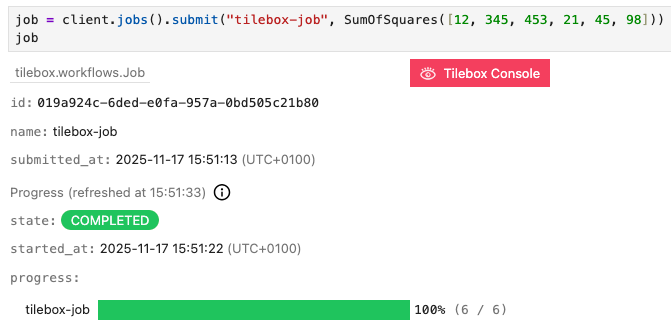
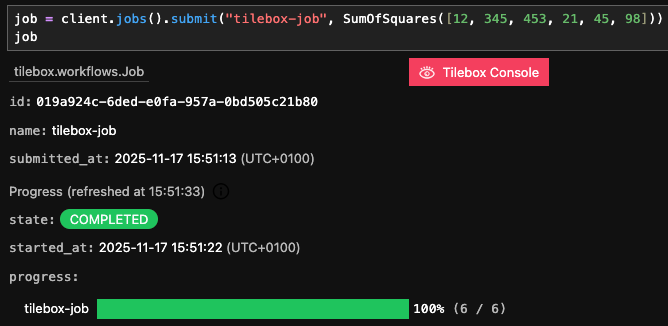
job, err := client.Jobs.Get(ctx, uuid.MustParse("018dd029-58ca-74e5-8b58-b4f99d610f9a"))In interactive environments such as Jupyter notebooks, the job object also provides a rich display of the job’s state and progress, if it’s used as the last expression in a cell.
States
Every Job is always in exactly one of the following states:
 Submitted
  Submitted
  Running
  Running
  Started
  Started
 COMPUTED, but others are still QUEUED, waiting for an eligible runner to pick them up. However no task is currently RUNNING. Completed
  Completed
 COMPUTED. Failed
  Failed
  Canceled
  Canceled
 You can programmatically check the state of a job by inspecting it’s state field.
from tilebox.workflows.data import JobState

job = job_client.find("018dd029-58ca-74e5-8b58-b4f99d610f9a")

print("Job is running:", job.state == JobState.RUNNING)job, err := client.Jobs.Get(ctx, uuid.MustParse("018dd029-58ca-74e5-8b58-b4f99d610f9a"))
fmt.Println("Job is running:", job.State == workflows.JobRunning)Job is running: TrueVisualization
Visualizing the execution of a job can be helpful. The Tilebox workflow orchestrator tracks all tasks in a job, including sub-tasks and dependencies. This enables the visualization of the execution of a job as a graph diagram.
job = job_client.find("some-job-id")  # or a recently submitted job
# Then visualize it
job_client.display(job)
The following diagram represents the job execution as a graph. Each task is shown as a node, with edges indicating sub-task relationships. The diagram also uses color coding to display the state of each task.


Below is another visualization of a job currently being executed by multiple runners.


From the diagram, the following can be inferred:
- The root task,
MyTask, has been executed, is marked asCOMPUTEDand submitted three sub-tasks. - At least three runners are available, as three tasks currently are executed simultaneously.
- The
SubTaskthat is still executing has not generated any sub-tasks yet, as sub-tasks are queued for execution only after the parent task finishes and becomes computed. - The queued
DependentTaskrequires theLeafTaskto complete before it can be executed.
Customizing Task Display Names
The text representing a task in the diagram defaults to a tasks class name. You can customize this by modifying the display field of the current_task object in the task’s execution context. The maximum length for a display name is 1024 characters, with any overflow truncated. Line breaks using \n are supported as well.
from tilebox.workflows import Task, ExecutionContext

class RootTask(Task):
    num_subtasks: int

    def execute(self, context: ExecutionContext):
        context.current_task.display = f"Root({self.num_subtasks})"
        for i in range(self.num_subtasks):
            context.submit_subtask(SubTask(i))

class SubTask(Task):
    index: int

    def execute(self, context: ExecutionContext):
        context.current_task.display = f"Leaf Nr. {self.index}"

job = job_client.submit('custom-display-names', RootTask(3))
job_client.display(job)type RootTask struct {
NumSubtasks int
}
func (t *RootTask) Execute(ctx context.Context) error {
err := workflows.SetTaskDisplay(ctx, fmt.Sprintf("Root(%d)", t.NumSubtasks))
if err != nil {
return fmt.Errorf("failed to set task display: %w", err)
}
for i := range t.NumSubtasks {
_, err := workflows.SubmitSubtask(ctx, &SubTask{Index: i})
if err != nil {
return fmt.Errorf("failed to submit subtask: %w", err)
}
}
return nil
}
type SubTask struct {
Index int
}
func (t *SubTask) Execute(ctx context.Context) error {
err := workflows.SetTaskDisplay(ctx, fmt.Sprintf("Leaf Nr. %d", t.Index))
if err != nil {
return fmt.Errorf("failed to set task display: %w", err)
}
return nil
}
// in main
job, err := client.Jobs.Submit(ctx, "custom-display-names",
[]workflows.Task{&RootTask{
NumSubtasks: 3,
}},
)

Cancellation
You can cancel a job at any time. When a job is canceled, no queued tasks will be picked up by runners and executed even if runners are idle. Tasks that are already being executed will finish their execution and not be interrupted. All sub-tasks spawned from such tasks after the cancellation will not be picked up by runners.
Use the cancel method on the job client to cancel a job.
job = job_client.submit('my-job', MyTask())
# After a short while, the job gets canceled
job_client.cancel(job)job, err := client.Jobs.Submit(ctx, "my-job",
[]workflows.Task{&MyTask{}},
)
if err != nil {
slog.Error("Failed to submit job", slog.Any("error", err))
return
}
// After a short while, the job gets canceled
err = client.Jobs.Cancel(ctx, job.ID)If any task in a job fails, the job is automatically canceled to avoid executing irrelevant tasks. Future releases will allow configuring this behavior for each task to meet specific requirements.
Retries
If a task fails due to a bug or lack of resources, there is no need to resubmit the entire job. You can simply retry the job, and it will resume from the point of failure. This ensures that all the work that was already done up until the point of the failure isn’t lost.
Below is an example of a failing job due to a bug in the task’s implementation. The following workflow processes a list of movie titles and queries the OMDb API for each movie’s release date.
from urllib.parse import urlencode
import httpx
from tilebox.workflows import Task, ExecutionContext

class MoviesStats(Task):
    titles: list[str]

    def execute(self, context: ExecutionContext) -> None:
        for title in self.titles:
            context.submit_subtask(PrintMovieStats(title))

class PrintMovieStats(Task):
    title: str

    def execute(self, context: ExecutionContext) -> None:
        params = {"t": self.title, "apikey": "<OMDB API Key>"}
        url = "http://www.omdbapi.com/?" + urlencode(params)
        with context.tracer.span("fetch-movie-stats") as span:
            span.set_attribute("movie.title", self.title)
            response = httpx.get(url).json()
        # set the display name of the task to the title of the movie:
        context.current_task.display = response["Title"]
        context.logger.info(
            "Movie release date fetched",
            title=response["Title"],
            released=response["Released"],
)package movie
import (
"context"
"encoding/json"
"fmt"
"io"
"net/http"
"net/url"
"github.com/tilebox/tilebox-go/workflows/v1"
)
type MoviesStats struct {
Titles []string
}
func (t *MoviesStats) Execute(ctx context.Context) error {
for _, title := range t.Titles {
_, err := workflows.SubmitSubtask(ctx, &PrintMovieStats{Title: title})
if err != nil {
return fmt.Errorf("failed to submit subtask: %w", err)
}
}
return nil
}
type Movie struct {
Title *string `json:"Title"`
Released *string `json:"Released"`
}
type PrintMovieStats struct {
Title string
}
func (t *PrintMovieStats) Execute(ctx context.Context) error {
apiURL := fmt.Sprintf("http://www.omdbapi.com/?t=%s&apikey=%s", url.QueryEscape(t.Title), "<OMDB API Key>")
response, err := http.Get(apiURL)
if err != nil {
return fmt.Errorf("failed to fetch movie: %w", err)
}
defer response.Body.Close()
body, err := io.ReadAll(response.Body)
if err != nil {
return fmt.Errorf("failed to read response: %w", err)
}
var movie Movie
err = json.Unmarshal(body, &movie)
if err != nil {
return fmt.Errorf("failed to unmarshal response: %w", err)
}
// set the display name of the task to the title of the movie:
err := workflows.SetTaskDisplay(ctx, *movie.Title)
if err != nil {
return fmt.Errorf("failed to set task display: %w", err)
}
fmt.Printf("%s was released on %s\n", *movie.Title, *movie.Released)
return nil
}Submitting the workflow as a job reveals a bug in the PrintMovieStats task.
job = job_client.submit('movies-stats', MoviesStats([
    "The Matrix",
    "Shrek 2",
    "Tilebox - The Movie",
    "The Avengers",
]))

job_client.display(job)job, err := client.Jobs.Submit(ctx, "movies-stats",
[]workflows.Task{&MoviesStats{
Titles: []string{
"The Matrix",
"Shrek 2",
"Tilebox - The Movie",
"The Avengers",
},
}},
)

One of the PrintMovieStats tasks fails with a KeyError. This error occurs when a movie title is not found by the OMDb API, leading to a response without the Title and Released fields.
Task logs from the runners confirm this:
Movie release date fetched title="The Matrix" released="31 Mar 1999"
Movie release date fetched title="Shrek 2" released="19 May 2004"
ERROR: Task PrintMovieStats failed with exception: KeyError('Title')
The corrected version of PrintMovieStats is as follows:
Fixed Task Implementation
class PrintMovieStats(Task):
    title: str

    def execute(self, context: ExecutionContext) -> None:
        params = {"t": self.title, "apikey": "<OMDB API Key>"}
        url = "http://www.omdbapi.com/?" + urlencode(params)
        with context.tracer.span("fetch-movie-stats") as span:
            span.set_attribute("movie.title", self.title)
            response = httpx.get(url).json()
        if "Title" in response and "Released" in response:
            context.current_task.display = response["Title"]
            context.logger.info(
                "Movie release date fetched",
                title=response["Title"],
                released=response["Released"],
            )
        else:
            context.current_task.display = f"NotFound: {self.title}"
context.logger.info("Movie release date not found", title=self.title)type PrintMovieStats struct {
Title string
}
func (t *PrintMovieStats) Execute(ctx context.Context) error {
url2 := fmt.Sprintf("http://www.omdbapi.com/?t=%s&apikey=%s", url.QueryEscape(t.Title), "<OMDB API Key>")
response, err := http.Get(url2)
if err != nil {
return fmt.Errorf("failed to fetch movie: %w", err)
}
defer response.Body.Close()
body, err := io.ReadAll(response.Body)
if err != nil {
return fmt.Errorf("failed to read response: %w", err)
}
var movie Movie
err = json.Unmarshal(body, &movie)
if err != nil {
return fmt.Errorf("failed to unmarshal response: %w", err)
}
if movie.Released != nil && movie.Title != nil {
err := workflows.SetTaskDisplay(ctx, *movie.Title)
if err != nil {
return fmt.Errorf("failed to set task display: %w", err)
}
fmt.Printf("%s was released on %s\n", *movie.Title, *movie.Released)
} else {
err := workflows.SetTaskDisplay(ctx, fmt.Sprintf("NotFound: %s", t.Title))
if err != nil {
return fmt.Errorf("failed to set task display: %w", err)
}
fmt.Printf("Could not find the release date for %s\n", t.Title)
}
return nil
}With this fix, and after redeploying the runners with the updated PrintMovieStats implementation, you can retry the job:
job_client.retry(job)
job_client.display(job)_, err := client.Jobs.Retry(ctx, job.ID)

Now the task logs show:
Movie release date not found title="Tilebox - The Movie"
Movie release date fetched title="The Avengers" released="04 May 2012"The job was retried and succeeded. The two tasks that completed before the failure were not re-executed.