
The Workflow Library is live in the Tilebox Console. You can browse ready-made geospatial workflows, submit jobs with your own inputs, and take the code further when you’re ready. We’ll keep adding workflows, giving you a growing collection of algorithms and processing pipelines to use and build on.
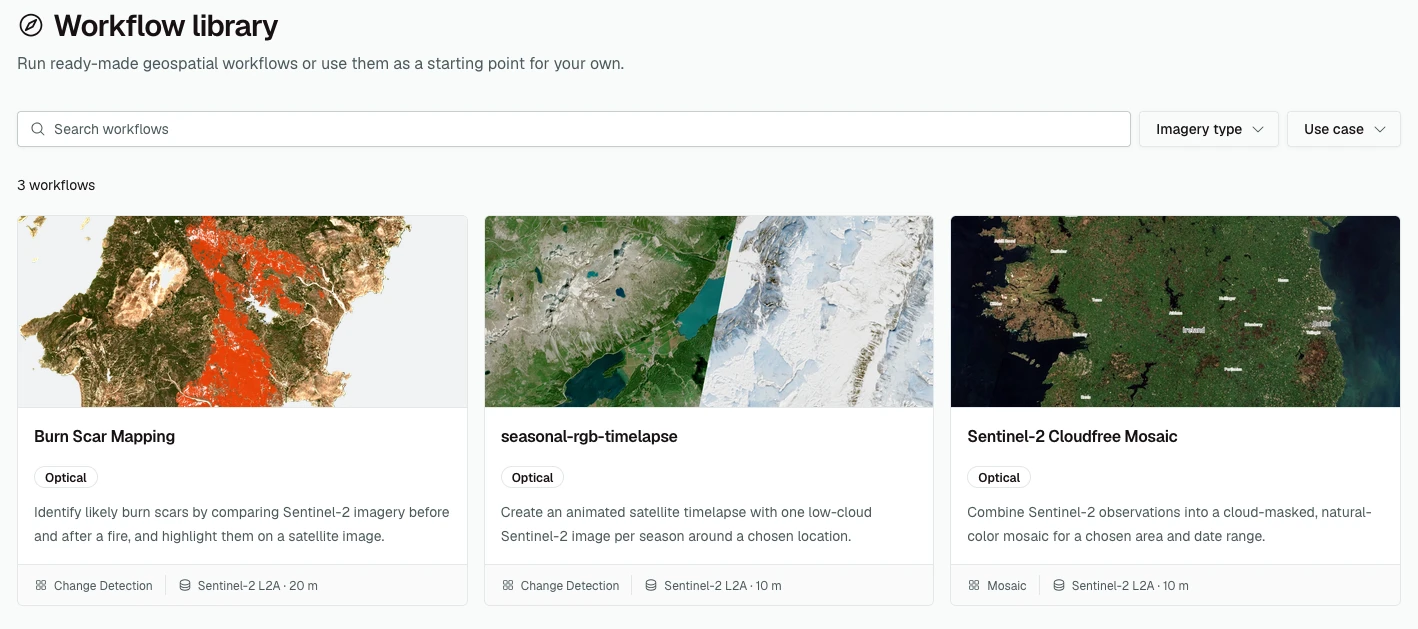
Browse by use case or imagery type to find a starting point for your project. Each workflow explains what it does and provides example inputs. Adjust those inputs to your needs, choose a target cluster, and submit a job. The Console handles deployment; your runners execute the workflow, and you can follow progress and inspect logs from the job page.
Every workflow in the Library is also a starting point for your own code. The Customize workflow tab connects the Library to the CLI’s new --template option, which downloads an independent copy of a published workflow. For example, with the Tilebox CLI installed and authenticated:
tilebox workflow init --template \
  tilebox:burn-scar-mapping
You get the latest published release’s Python source, dependencies, and build configuration. Review the code, then run uv sync inside the project directory to install its dependencies.
Change the processing logic, bring in another dataset, or adapt the outputs to your application. You can edit the code yourself or use the Library’s suggested prompts with your coding agent. Publishing your changes creates your own workflow and leaves the original untouched.
Explore the Workflow Library. If you don’t find what you need, use Request a workflow to tell us what you’d like to run.