Turn geospatial data into services your customers can rely on
Find the data you need, run your processing workflows, and debug
failures in one system. Use your existing code and run it on
infrastructure you control.
Build workflows independent of your compute infrastructure. Tilebox
coordinates tasks and dependencies while your code runs on the
infrastructure you choose, on demand or on schedule.
Your prototype is ready for users. A customer needs another data
source. A new deployment has to run in a different environment.
Tilebox helps your team take each next step.
Launch your service
Spend engineering time on your product, not cataloging and task
coordination.
Support new environments
Reuse your workflow logic across cloud and customer deployments.
Expand without rebuilding
Add data sources and analyses without starting over.
“Through an in-orbit demonstration mission with Tilebox, we’re validating that our compression software can run reliably in orbit after development on the ground.”
Michael StanwayCEO and co-founder, The Compression Company
“With Tilebox, our data scientists could query the data they needed directly. Within two days, they were producing research reports from the ADLER mission data.”
Christian FederspielCEO, Findus
1 / 3
Use the stack you already have.
Keep your code, libraries, and infrastructure. Tilebox coordinates the
workflow and gives you visibility into each execution.
Python
COG
Zarr
Azure
On-prem
Python
COG
Zarr
Azure
On-prem
Made for humans and their agents.
Everything engineers can do with Tilebox is fully accessible to agents.
Your agent can write workflows, diagnose failures, monitor runs, fix
code, redeploy, and retry in a fast, autonomous feedback loop.
>
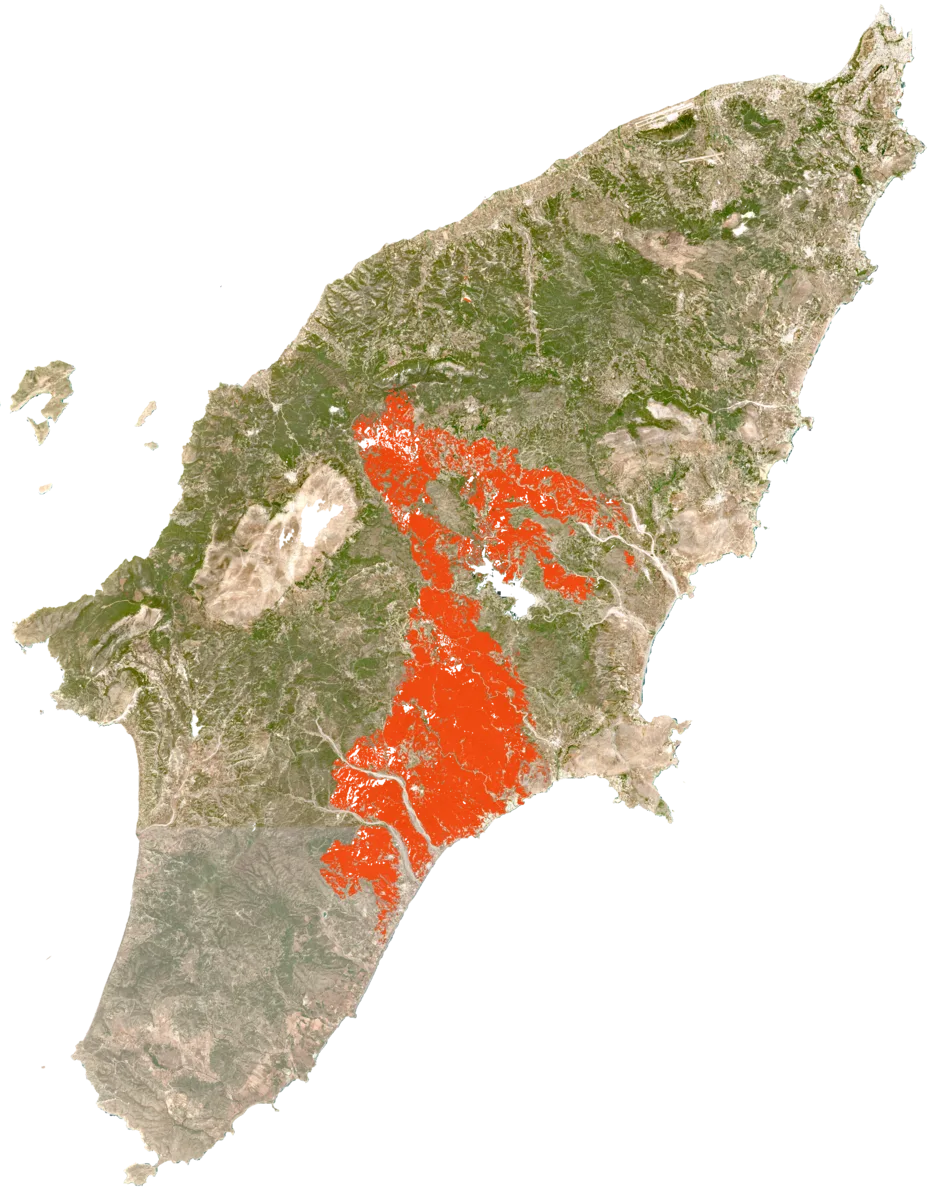
Why did the recent wildfire job fail? Investigate and fix it.
I’ll find the latest failed wildfire job, inspect its tasks and
logs, and update the workflow.
Listing failed jobs
Inspect job wildfire-sicily-0923
Failed task: map_burn_scar
Read task logs
ValueError: CRS mismatch
I found the issue: the fire perimeter uses EPSG:4326, but the
satellite scenes use EPSG:32633. The clipping step expects both to
use the same coordinate system.
I’ll reproject the perimeter to each scene’s CRS before clipping, so
the workflow handles scenes in different UTM zones.
Edit wildfire.py +3−1
Updated wildfire.py. The fix is ready to deploy; the existing job
hasn’t been retried yet.
>Deploy the fixed workflow, then retry the job.
I’ll deploy the updated workflow to the job’s cluster, retry the
failed job, and watch it through to completion.
List clusters
Deploy workflow to eo_cluster
Retry job wildfire-sicily-0923
Monitor job completion
The clipping task has passed. The remaining tasks are writing the
burn-scar result to storage.
Job succeeded. Result saved to:
s3://wildfire-results/sicily/burn-area.tif
We already have a catalog and scheduler. Why use Tilebox?
With separate tools, your team maintains the connections between data discovery, task execution, and debugging. Tilebox brings a live geospatial catalog, workflow coordination, and job-level logs and traces into one system, including workflows that span different compute environments. You still configure your processing and data access, but have fewer connections to build and maintain. Start with one workflow where that work is slowing your team down.
Where does my code run, and does Tilebox move my data?
Your code runs on runners deployed where you need them: cloud infrastructure, local machines, on-prem servers, or suitable edge hardware. Tasks in the same workflow can execute in different environments.
Tilebox can catalog metadata and file references without centralizing the raw files. Your workflow determines what data to read, transfer, and write. Cloud-connected runners need access to the Tilebox API; fully disconnected environments require a separate deployment.
How much of my code has to change?
Keep your existing analysis and dependencies. Wrap the work you want to orchestrate in Tilebox tasks, define their inputs, and submit a job. You keep your analysis logic and compatible libraries while giving the workflow a structure Tilebox can coordinate.
You still configure the runtime, data access, and outputs. You can begin with one workflow rather than migrating your entire application.
What happens when a task or runner fails?
Tilebox records task failures so you can inspect the error, fix the cause, and retry the job without losing all previously completed work. If a runner stops responding, heartbeat detection allows its task to be retried on a compatible runner, subject to retry limits. Tasks should be idempotent because a retry can execute them more than once.
Can our agent use Tilebox too?
Yes. Your agent can use the CLI and skills to query data, run workflows, and inspect job status and logs through authenticated access. This gives the agent real execution context.
The free Labs plan lets you prototype workflows with open data or your own catalog. You can start with an existing analysis or one of our templates, connect its inputs, run it, and inspect the results.






















--%3e%3cdefs%3e%3cstyle%3e.cursor_dark__st0{fill:%23edecec}%3c/style%3e%3c/defs%3e%3cpath%20class='cursor_dark__st0'%20d='M457.43,125.94L244.42,2.96c-6.84-3.95-15.28-3.95-22.12,0L9.3,125.94c-5.75,3.32-9.3,9.46-9.3,16.11v247.99c0,6.65,3.55,12.79,9.3,16.11l213.01,122.98c6.84,3.95,15.28,3.95,22.12,0l213.01-122.98c5.75-3.32,9.3-9.46,9.3-16.11v-247.99c0-6.65-3.55-12.79-9.3-16.11h-.01ZM444.05,151.99l-205.63,356.16c-1.39,2.4-5.06,1.42-5.06-1.36v-233.21c0-4.66-2.49-8.97-6.53-11.31L24.87,145.67c-2.4-1.39-1.42-5.06,1.36-5.06h411.26c5.84,0,9.49,6.33,6.57,11.39h-.01Z'/%3e%3c/svg%3e)
%20scale(420%20260)'%20gradientUnits='userSpaceOnUse'%3e%3cstop%20stop-color='%23526044'%20stop-opacity='0.45'/%3e%3cstop%20offset='1'%20stop-color='%2348503A'%20stop-opacity='0'/%3e%3c/radialGradient%3e%3cradialGradient%20id='below-p'%20cx='0'%20cy='0'%20r='1'%20gradientTransform='translate(675%20690)%20rotate(2)%20scale(250%20160)'%20gradientUnits='userSpaceOnUse'%3e%3cstop%20stop-color='%23504829'%20stop-opacity='0.2'/%3e%3cstop%20offset='1'%20stop-color='%23504829'%20stop-opacity='0'/%3e%3c/radialGradient%3e%3cradialGradient%20id='lower-center'%20cx='0'%20cy='0'%20r='1'%20gradientTransform='translate(692%20900)%20rotate(-4)%20scale(235%20190)'%20gradientUnits='userSpaceOnUse'%3e%3cstop%20stop-color='%23364F28'%20stop-opacity='0.16'/%3e%3cstop%20offset='1'%20stop-color='%23364F28'%20stop-opacity='0'/%3e%3c/radialGradient%3e%3cfilter%20id='wordmark-shadow'%20x='-20%25'%20y='-20%25'%20width='140%25'%20height='150%25'%3e%3cfeDropShadow%20dx='0'%20dy='11'%20stdDeviation='8'%20flood-color='%23000000'%20flood-opacity='0.5'/%3e%3c/filter%3e%3c/defs%3e%3cg%3e%3crect%20width='1024'%20height='1024'%20fill='url(%23background)'/%3e%3crect%20width='1024'%20height='1024'%20fill='url(%23right-side)'/%3e%3crect%20width='1024'%20height='1024'%20fill='url(%23below-p)'/%3e%3crect%20width='1024'%20height='1024'%20fill='url(%23lower-center)'/%3e%3c/g%3e%3cg%20filter='url(%23wordmark-shadow)'%3e%3cpath%20transform='translate(113%20302.27)%20scale(2.8362989324)'%20d='M236.014%2020C260.431%2020.0001%20280.602%2037.4115%20280.603%2064.7432C280.602%2093.5337%20260.065%20114.166%20233.52%20114.166C224.158%20114.166%20215.639%20112.422%20208.63%20108.49C202.886%20105.27%20198.203%20100.605%20194.919%2094.3379L188.115%20141.822L187.946%20143.016H174.214L174.448%20141.423L191.772%2022.4941H205.372L203.937%2031.3369C212.143%2023.8608%20223.2%2020.0002%20236.014%2020ZM47.082%2020.1543C56.4435%2020.1543%2065.0012%2021.8991%2072.0488%2025.8486C77.8222%2029.0831%2082.5323%2033.7713%2085.8271%2040.085L88.1201%2023.6924L88.2861%2022.4932H101.863L89.1611%20110.633L88.9873%20111.826H75.4092L76.7227%20102.855C68.5854%20110.456%2057.3981%20114.323%2044.5889%20114.323C20.1709%20114.323%200.000167223%2096.9087%200%2069.5771C0.000149745%2040.7854%2020.54%2020.1549%2047.082%2020.1543ZM116.234%20110.636L116.061%20111.827H102.485L115.351%2023.6855L115.521%2022.4941H129.083L116.234%20110.636ZM140.673%20110.636L140.499%20111.827H126.924L139.789%2023.6855L139.96%2022.4941H153.521L140.673%20110.636ZM177.958%2022.4941L165.108%20110.636L164.935%20111.827H151.36L164.225%2023.6855L164.396%2022.4941H177.958ZM48.4854%2031.9844C27.8638%2031.985%2014.0133%2048.3799%2014.0127%2068.9521C14.0127%2077.7907%2016.8094%2086.1771%2022.3145%2092.334C27.7973%2098.4657%2036.0631%20102.493%2047.2402%20102.493C67.8534%20102.493%2081.7122%2085.9487%2081.7129%2065.3682C81.7129%2055.4076%2078.2493%2047.0792%2072.4131%2041.2441C66.5794%2035.4088%2058.2871%2031.9844%2048.4854%2031.9844ZM233.362%2031.8291C212.749%2031.8297%20198.89%2048.3716%20198.89%2068.9521C198.89%2078.9123%20202.356%2087.2403%20208.189%2093.0742C214.023%2098.9107%20222.315%20102.336%20232.116%20102.336C252.738%20102.335%20266.589%2085.9407%20266.59%2065.3682C266.59%2056.5296%20263.795%2048.1424%20258.29%2041.9863C252.807%2035.8551%20244.542%2031.8291%20233.362%2031.8291Z'%20fill='%23DFDFC1'/%3e%3c/g%3e%3c/svg%3e)