

Command Line Interface (CLI) tools were built for humans, but today's coding agents need definitive structure and rules. We've designed our CLI for both.
Humans get a clean, readable terminal experience with familiar commands
AI agents get structured, predictable output they can reliably parse and act on
Tilebox CLI v0.1.0
With this release, developers, operators, and coding agents gain a direct access point to Tilebox from the terminal: inspect datasets, query datapoints, submit workflow jobs, read logs, search docs, and discover the whole command surface without leaving the shell.
The release is built around a simple idea: a CLI should be readable for humans and precise enough for agents. Humans need concise commands, useful terminal output, and familiar verbs. Agents need structured output, bounded results, clear validation, and machine-readable descriptions of what each command accepts and returns. Tilebox CLI supports both use-cases right from the very first release.
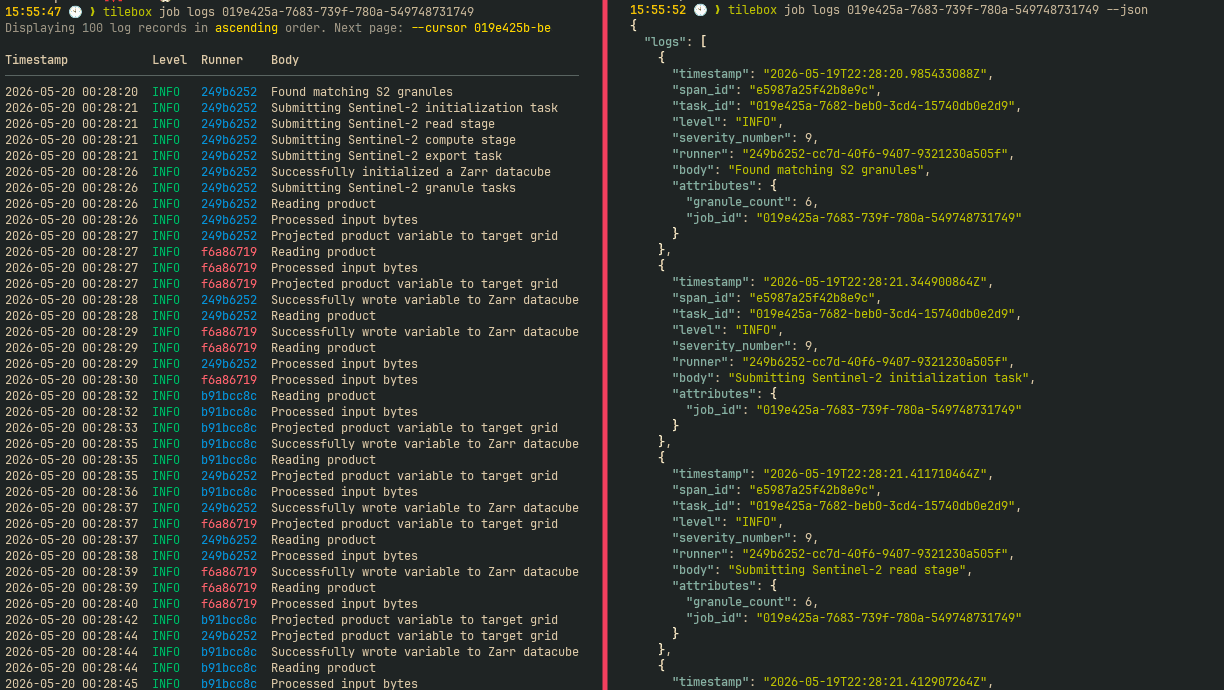
Tilebox CLI for Humans (left) and Agents (right)
Agent-native CLI design principles
Agent support isn't one feature. It is a set of design choices that reduce ambiguity every time a command runs.
Consistent vocabulary: Commands are grouped into clear families such as
dataset,job, andcluster, and use consistent verbs such aslist,get,create,update,delete, andsubmit.Structured output: Every commands accepts a
--jsonflag, which gives agents parseable results without changing the command a human would use.Structured discovery:
tilebox agent-contextexposes commands, arguments, flags, descriptions, and output schemas as JSON.File-based input: Commands support shorthand input for small values and file input for larger generated content; for example,
tilebox dataset createaccepts both--descriptionand--description-file.Async-aware workflows: Commands that trigger asynchronous execution can wait on output, avoiding fragile polling loops in scripts and agent workflows.
Bounded and paginated results: All
listoperations expose explicit--limitand--cursorflags, so agents can control output size and explicitly paginate when requested.Actionable validation: Validation errors are concise and explain how to fix the input.
These choices also improve the human experience. A predictable CLI is easier to use, easier to script, and easier to debug when something goes wrong.
Command context for agents
tilebox agent-context is the main agent-native interface in the CLI. It returns machine-readable command metadata directly from the binary, so an agent can inspect the available commands before deciding what to run.
The context can be scoped to one command:
For commands with structured output, agents can request the output schema before executing the command:
For tilebox job list, the schema describes fields such as jobs, next_cursor, sort_order, job id, state, submitted_at, progress, and execution_stats. An agent can use that schema to choose a jq expression, decide whether pagination is needed, or validate the output it receives.
Agent skills for Tilebox
Alongside the CLI, we are publishing tilebox/skills: Agent Skills that explain how agents can best use the Tilebox CLI. The CLI exposes the command surface and output schemas; the skills teach agents how to combine those commands into reliable Tilebox workflows.
Together, --help, agent-context, and Tilebox Skills give humans and agents the right level of guidance for the task at hand.
Start using the Tilebox CLI
Tilebox CLI v0.1.0 is available now. Install it, create an account and API key in the Tilebox Console to get started: