

Whether you are exploring geospatial data for the first time, or a veteran engineer, here are three ways Tilebox makes it easier to get from query to code.
1. Export as Code in the Console (Beginner)
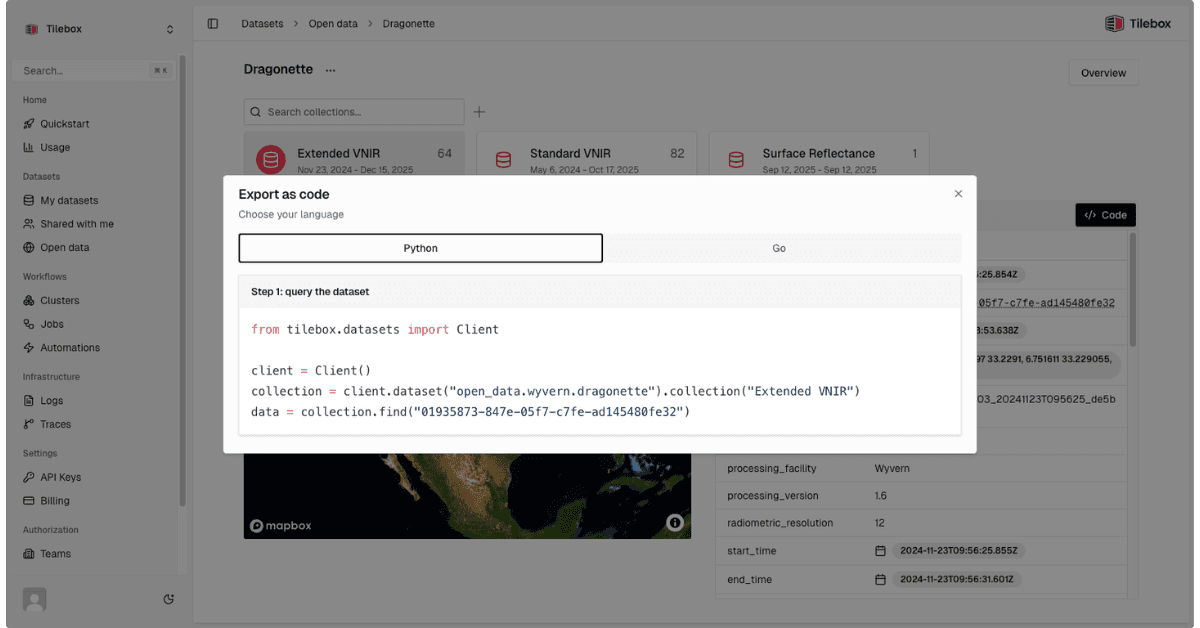
The Tilebox Console is a visual dataset explorer. Browse available datasets, draw your area of interest, set a time window, apply quality filters, and then hit Export as Code. You get a ready-to-run Python script, pre-filled with the correct dataset slug, collection name, and storage client for that provider. Copy, paste, run.
Best for: first-time users, analysts who want to prototype quickly, or anyone exploring a dataset they haven't worked with before.
2. Write It Directly with the SDK (Intermediate)
Once you're comfortable with Tilebox's patterns, you can write queries directly. Install tilebox-datasets and tilebox-storage, initialize a client with your API key, and you're querying scene metadata with a spatio-temporal filter in a few lines. The same query structure works across every dataset in your catalog (Sentinel, Landsat, Umbra SAR, Wyvern). Write once, deploy anywhere.
Best for: developers building pipelines, automating workflows, or integrating Tilebox into existing codebases.
3. Ask an Agent (Anyone)
After connecting the Tilebox MCP directly to your AI coding assistant, like Claude or Cursor, the agent can query your live catalog in real time. It knows your dataset slugs, collection names, and schemas before it writes a single line, so you can prompt it in plain English: "Write me a script to pull all Sentinel-2 scenes over Berlin with less than 10% cloud cover for Q1 2025." The agent handles the lookup problem entirely.
Best for: developers working in AI-assisted IDEs, and anyone who wants to skip from intent to working code in one step.
Whichever path fits your workflow, the underlying result is the same: less time on data access infrastructure, more time on the analysis that actually matters.
Start prototyping or validate your current workflows with Tilebox Labs | $0/mo - no credit card required. Sign up here.